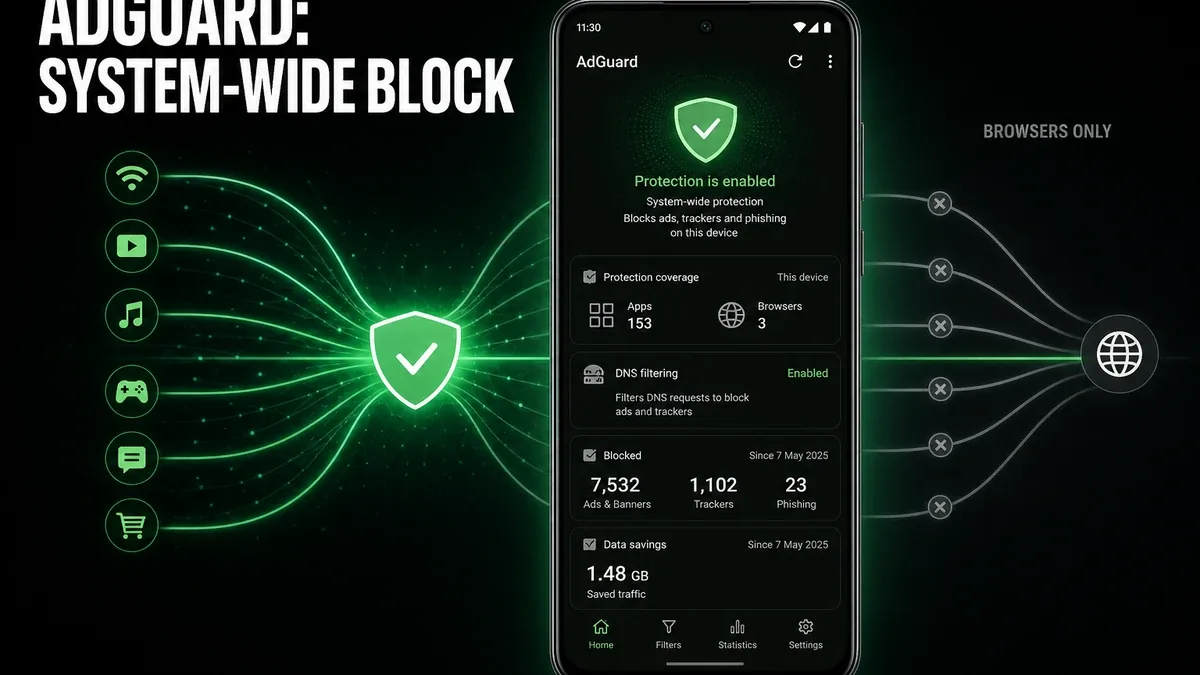
A browser blocker can quiet Chrome tabs and still leave interstitial ads inside free games, news apps, and video players. If interruptions follow you after you close the browser, the unfinished job is device traffic — not one extension checklist.
Download AdGuard MOD APK - Premium Unlocked
AdGuard · System-Wide Filtering · Trackers · Browser Blockers · Android 2026
The Real Split Is Multi-App Coverage vs Browser-Only Coverage
On Android, “ad block” covers two different installation shapes. Browser-only tools (built-in blockers, single-browser modes) clean page loads inside that browser. System-wide filtering, the path AdGuard is built for, sits under more of the device network path — including many apps that pull banners, trackers, or ad-heavy webviews outside Chrome.
The core thesis of this article is simple: AdGuard is better when ads and trackers interrupt you in browsers and in free apps after the browser is closed, while browser-only blocking remains better when pain lives only in web pages and you want the smallest setup. The core trade is broader coverage for a heavier first setup (local protection / filtering layer), not “privacy brand purity.”
Why Browser-Only Wins Still Leave Half the Phone Noisy
Concrete pattern: you enable blocking in Chrome, tabs calm down, then a free weather or game app still forces full-screen ads between short sessions. Another pattern: in-app browsers and streaming-related surfaces still phone home with trackers the browser extension never saw. Browser tools solved the tab; they did not own app traffic.
AdGuard’s selection case is multi-surface noise: browser + ad-supported apps on the same phone. Expect a longer first day — enabling protection, allowing the local filtering/VPN-style connection Android requires, and optionally HTTPS / DNS filter choices — usually more than flipping one browser toggle. That setup cost is the price of coverage across apps.
This article is about coverage scope (where ads are blocked). It is not the later maintenance story of endless exception lists when a protected bank login or stream breaks — that friction lane belongs to a different write-up. For storage junk rather than ad noise, see when CCleaner is worth using. For install bloat rather than network noise, see when AppMgr Pro III is worth using.
What AdGuard Actually Does Better
AdGuard MOD APK earns the install when you can name two places ads appear after browser blocking is already on — for example a free game interstitial and a news app webview — and still want both quieter.
What you gain: one filtering layer aimed at browser and multi-app traffic, optional DNS-style filtering, and tracking reduction not limited to one browser package.
What you lose: install lightness. Day-one protection setup is longer than turning on Chrome blocking, and you accept a persistent local filtering service on the phone.
AdGuard is strongest when ad noise is multi-app. It is weaker when the only weekly annoyance is banners inside one browser you already control.
Best For, Not Ideal For
AdGuard is best for: users who still hit ads inside free apps and webviews after browser blockers are enabled.
Browser-only blockers are better when: web pages are the entire problem and a one-toggle browser solution is enough.
Not ideal for AdGuard: users who refuse any filtering setup day, or who only open one ad-light browser and almost no free apps.
Biggest cost: setup weight. The unit of cost is first-day configuration time and a always-on filtering path — not endless later tuning of broken sites (that is a different trade).
Common mistake: installing a system filter when only Chrome is noisy, then blaming the tool for “too much software” when browser-only would have been enough.
Before You Choose AdGuard
Before choosing AdGuard, list yesterday’s ad hits. If both a browser tab and a free app fired full-screen ads, system-wide coverage is the honest upgrade. If every hit was inside Chrome, try browser blocking first for a week.
For install friction, keep the APK parsing error fix and the MOD APK safety guide nearby.
Our Honest Recommendation
Choose AdGuard when multi-app ad coverage is the unfinished job and you accept day-one protection setup. Stay browser-only when the noise never leaves web pages.
In short: AdGuard is better for device-wide coverage. Browser blockers are better for page-only scope with minimum install weight.
How to Download AdGuard MOD APK
Since the modded version is not available on the Google Play Store, you need to install it manually. Follow these steps:
- Enable Unknown Sources: Open Android settings, go to "Security" or "Apps," and enable "Install from Unknown Sources."
- Download the APK: Use the app page link to get the latest AdGuard MOD APK version.
- Remove Conflicting Versions: Uninstall the official AdGuard build first if installation fails due to signature conflict.
- Install the APK: Tap the downloaded file, complete installation, and finish the local protection enablement Android prompts for.
- Judge It by Multi-Surface Coverage: After setup, open one browser session and one free app that usually shows interstitials. Ask whether both got quieter — browser-only tools fail this pair test by design.
System-wide filtering only beats browser blockers if ads outside the browser drop too. Quieter tabs alone are not enough justification.
FAQ
Is AdGuard better than Chrome’s built-in or extension blocking?
For free apps and webviews after the browser closes, usually yes. For page-only browsing annoyance, browser tools can be enough.
Who should use AdGuard?
Users who still hit ads in free apps after browser blocking is already on, and who will complete day-one protection setup.
When is AdGuard the wrong choice?
When noise lives only in one browser, or when you will not enable the local filtering path Android requires.
What is the biggest trade-off with AdGuard?
You gain multi-app coverage, but first-day setup and a persistent filtering layer cost more than a browser toggle.
If ads still fire inside free apps after Chrome gets quiet, AdGuard is the clearer coverage upgrade than another browser-only checklist.